Why is bootrom important? iBoot or bootrom basically fires up when you are restoring your iPhone via iTunes. This makes sure that you are flashing a firmware which is greater or equal to the current version on the phone, and that it is genuine and legit (not custom firmware). Now the old bootrom version, which was exploited by “24kpwn” was patched by Apple in fall 2009 and so any iPhone 3GS shipped after around November last year pretty much had the new bootrom which now needs a new exploit. If you have the iPhone 3GS and wonder if you can jailbreak and unlock it or not, please check you bootrom using the method below. If your still running the old bootrom, then yes at the moment your device is jailbreakable. However, for those of you who are running the old bootrom, a solution is currently being crafted by the iPhone DevTeam. As soon as it's released, I will update it onto this page and let you all know. Thanks! Peter Windows 7/Vista/XP Step 1: Put your iPhone into DFU Mode (not recovery mode) Note: Your iPhone screen at this time should be blank (black in color), if not, then you are most likely in Recovery Mode, not DFU mode. Step 2: Right Click on My Computer and click on: Properties -> Hardware(tab) -> Device Manager Step 3: Select the “+” to open submenus tree items for "Universal Serial Bus (USB) Controller". Step 4: Now look for "Apple Mobile Device USB Driver", right click and select Properties. Step 5: Go to "Details" and find "Device Instance ID". Step 6: Simply scroll through the string and you’ll find the bootrom version (iBoot) as shown in the screenshots below: Step 7: If it’s 359.3, you have old bootrom. If it’s 359.3.2 or anything above that, its a new bootrom. on Mac OS X Step 1: Put your iPhone into DFU Mode (not recovery mode) Note: Your iPhone screen at this time should be blank (black in color), if not, then you are most likely in Recovery Mode, not DFU mode. Step 2: Run "System Profiler" and navigate to: Hardware -> USB (menu on left). Step 3: At the top right under “USB Device Tree” panel click “Apple Mobile Device (DFU Mode)”. Step 4: Now down under in “Serial Number”, simply go through the string and you’ll find the bootrom version (iBoot) as shown in the screenshots below: Step 5: If it’s 359.3, you have old bootrom. If it’s 359.3.2 or anything above that, its a new bootrom. Note: In both the cases above, it doesn’t matter whether your iPhone is an MB model or an MC model. As long as it has 359.3 bootrom, it is iPhone 3GS with old bootrom, and if 359.3.2 or above then it is iPhone 3GS with new bootrom. for iPod touch 2G and iPod touch 3G Bootroms are not applicable here, therefore rule of thumb for iPod touch 2G in order to identify if it is jailbreakable on iOS 4 is to check whether it is an MC model or non-MC model (which is usually MB model). If your iPod touch 2G is MC model, then it is not jailbreakable, for everything else, it is jailbreakable. All iPod touch 3G’s are not jailbreakable on iOS 4. Like iPhone 3GS (new bootrom) and iPod touch 2G (MC model), they require a new exploit in order to jailbreak them on iOS 4. [Credits:Pece1976 on ModMyi]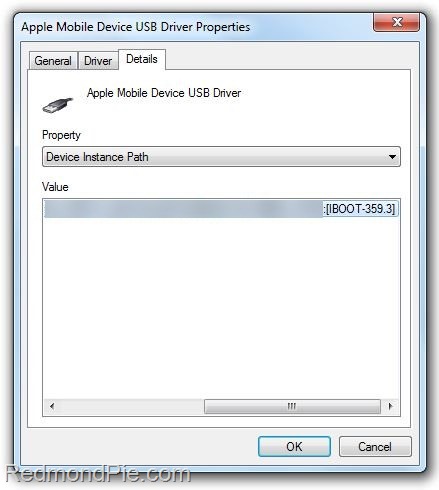 iPhone 3GS – Old Bootrom 359.3
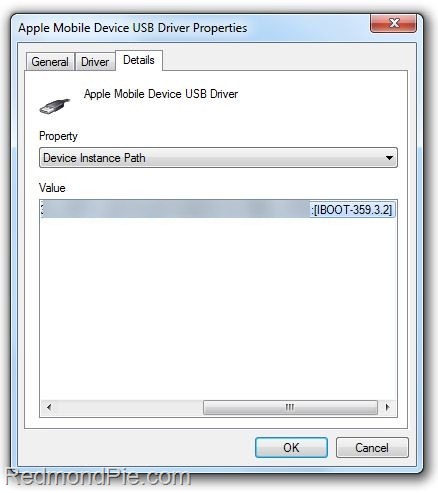 iPhone 3GS – New Bootrom 359.3.2
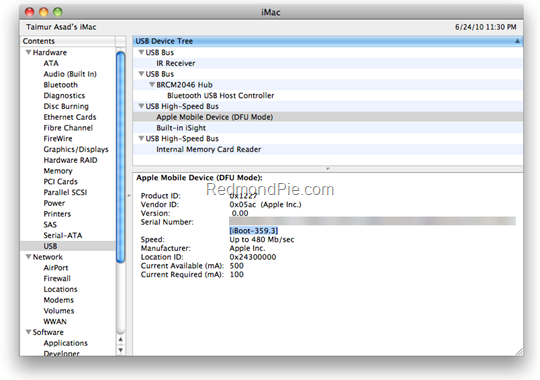 iPhone 3GS – Old Bootrom 359.3